- Input
- Images, video or camera input
- Result
- A scene with its source
- Context
- Capture context and what to inspect
LOGOS
Understand the scene.
Know what comes next.
LOGOS connects images and video to observations, evidence and the next action. From workplace safety to equipment condition and product quality.
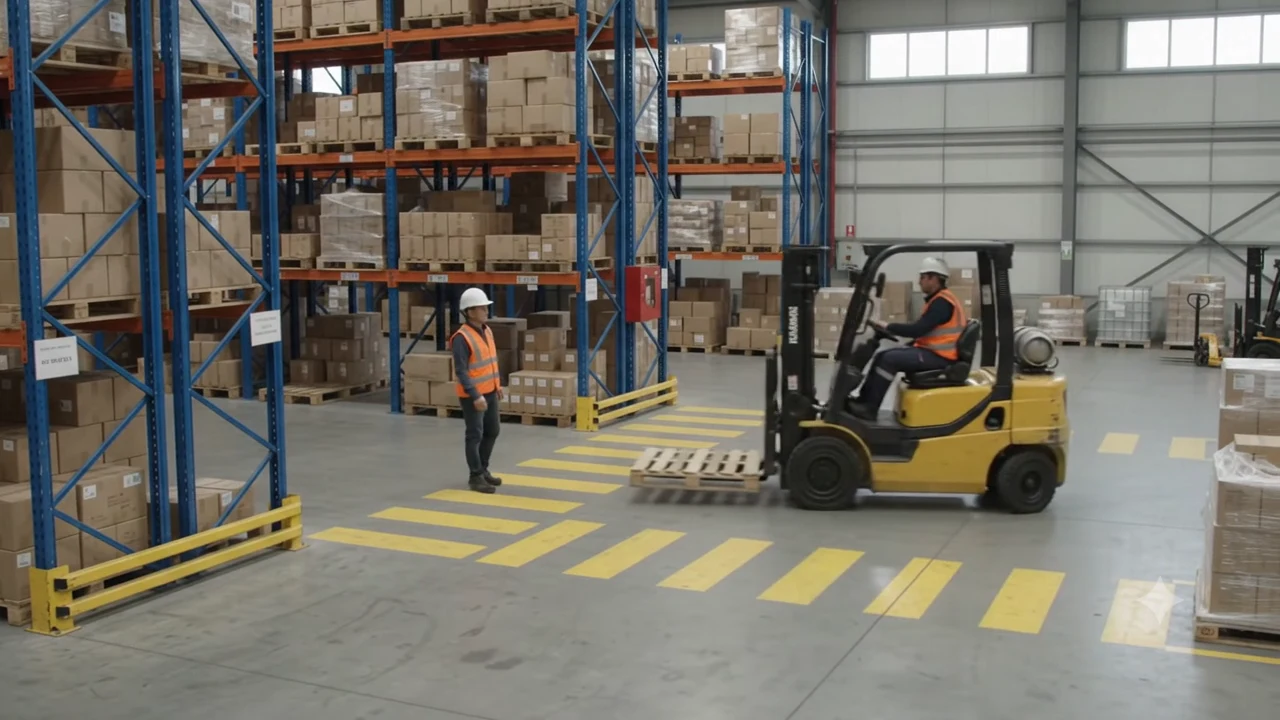 Area to review
A forklift occupies the crossing where a worker is standing.
Processing server
LOGOSVision + Language- Read the scene
- Identify relationships
- Apply task context
Worker / forklift / crossing
Start with a scene.
Check whether people and handling equipment share a passage.
Next
The server structures the observation.
AI-generated scenes with illustrative analysis.
Connect actions after the responsible person reviews them.
From scene to record
The scene, with the context intact.
0.0 / 8s
What is in view. Where it is.
Read people, objects and their spatial relationships together. Keep each observation connected to its source image so a reviewer can return to the scene.
How it works
Read the scene.
Carry the work forward.
- Input
- People, objects and positions
- Result
- A record of what is present and where
- Context
- Visible facts and what still needs checking
- Input
- Observations and task instructions
- Result
- Possible anomalies and their evidence
- Context
- Site procedures and inspection criteria
- Input
- A record reviewed by the responsible person
- Result
- Reports, alerts and follow-up work
- Context
- Connected systems and action permissions
Applications
Different scenes. A shared workflow.
Review movement on site
Record the relationship between people and equipment, and bring shared-path scenes to the attention of the site operator.
Crossings, work areas and access pointsInspect equipment changes
Inspect traces on equipment alongside the surrounding conditions. Preserve the location and observation for maintenance review.
Exterior checks, possible leaks and maintenance recordsReview product surfaces
Locate surface marks and retain the image evidence for comparison with the product’s inspection criteria.
Surface inspection, review queues and decision recordsSystem design
Designed around your operation.
- 01Visual input
- 02Scene understanding
- 03Observation record
- 04Task context
- 05Human review
- 06Action and alerts
- 07System integration
- Storage
- Agree where source footage and results are stored, and for how long, before deployment.
- Network
- Review the site network and data-transfer restrictions first.
- Processing
- Plan the model runtime around footage volume and processing frequency.
- Review
- Define who reviews records and decides on follow-up actions.
- Records
- Agree which fields to retain and who needs access to them.
- Integration
- Scope each connection after reviewing the target interface and permissions.
Agree the processing configuration and integrations around your inputs and working procedures.
Railway field application
2026-04-11Nakdong 1 Tunnel.
A field application by LUDO Lab and SmartRail at Nakdong 1 Tunnel on the Bujeon–Masan railway. The published record describes CCTV inputs, edge processing, language records and response scenarios.
Explore the field application ↗Deployment
Designed for your environment.
Camera inputs, data storage, network access and the review workflow shape each deployment.
Questions
Before we get started.
01What inputs can we start with?
Tell us the image or video type, capture environment and what you need to observe. If source material is needed, we will agree a suitable way to share it.
02Can it connect to our existing workflow?
We review the target system, available interfaces and access permissions before agreeing the integration scope. Compatibility is assessed per system.
03Where is data processed?
Processing location depends on data policy, network and available hardware. Tell us if local or edge processing is a requirement.
04Are decisions and actions fully automated?
The starting point is structured observation and decision support. External actions and alerts require an agreed review and approval process.
Get in touch
What would you like to see more clearly?
Tell us about the scenes you work with and your current workflow. We will help define the useful observations and what should happen next.
[email protected] ↗